
How to Edit Word Documents Online for Free
Updated September 23, 20267 min read1,372 words
Published by FreeWordEditor.com
The worked example below was edited in the actual browser editor. Its exported DOCX text was checked for the three replacements. This did not test Microsoft Word rendering, complex layout or PDF export.
How we check our guidesIf you need to update text in a DOCX file without installing Word, FreeWordEditor.com lets you open it in your browser, edit it, and download a new DOCX or PDF. This walkthrough uses the site's real controls, explains when your changes are saved, and points out the Word features that need checking elsewhere.
Edit a Word document online in 3 steps
Use a DOCX file rather than an older DOC file. The editor opens it locally in your browser; complex layouts may not look identical to Microsoft Word. Keep the original file until you've checked the downloaded result.
- 1Go to the FreeWordEditor.com homepage and drag your .docx file into the upload box (or click "Choose DOCX File").
- 2When the editor loads, click in the document body to change text. Use the toolbar for available text and paragraph formatting. If the document has a table, click a cell to edit its contents.
- 3Wait until the status says "Saved on this device". Then open Export and choose "Word Document (.docx)" for an editable copy or "PDF Document (.pdf)" for a shareable copy. Open the downloaded file to check it.
Worked example: update a garden planning note
Try this with a fictional, non-sensitive practice document: a short planning note with a meeting date, a sentence and a two-column task table. Keep the source unchanged so you can compare it with your downloaded copy.
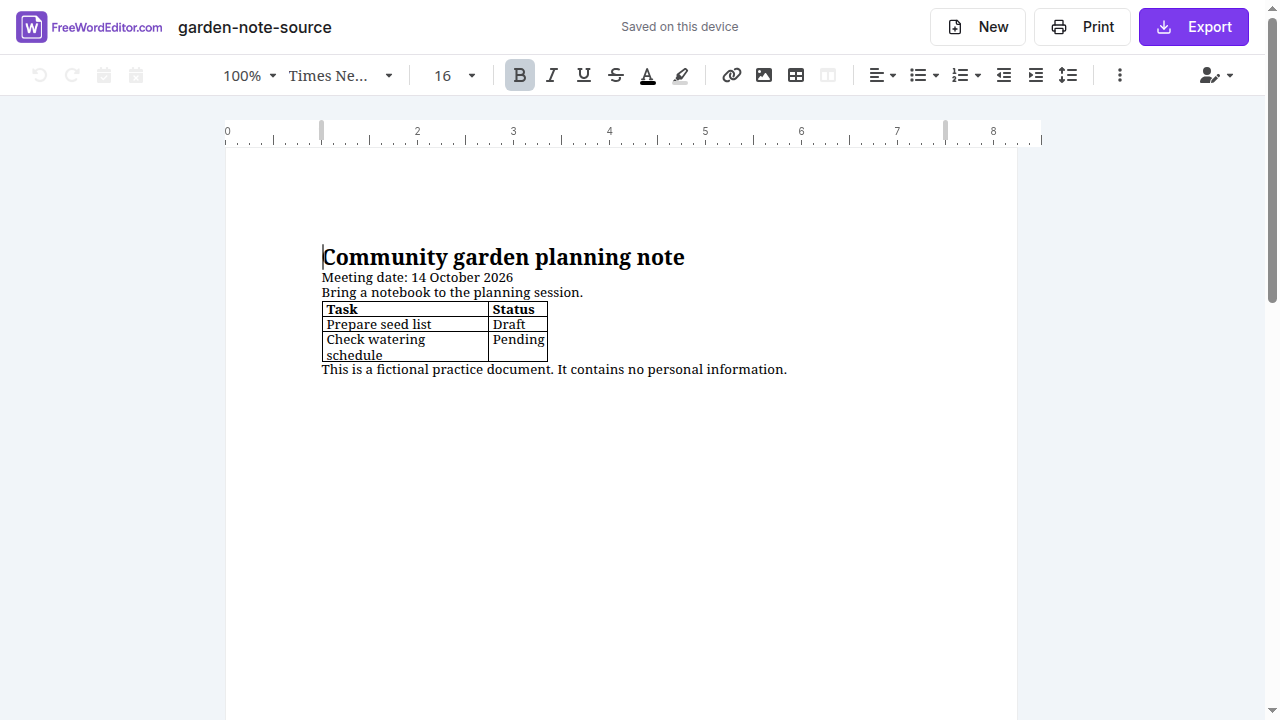
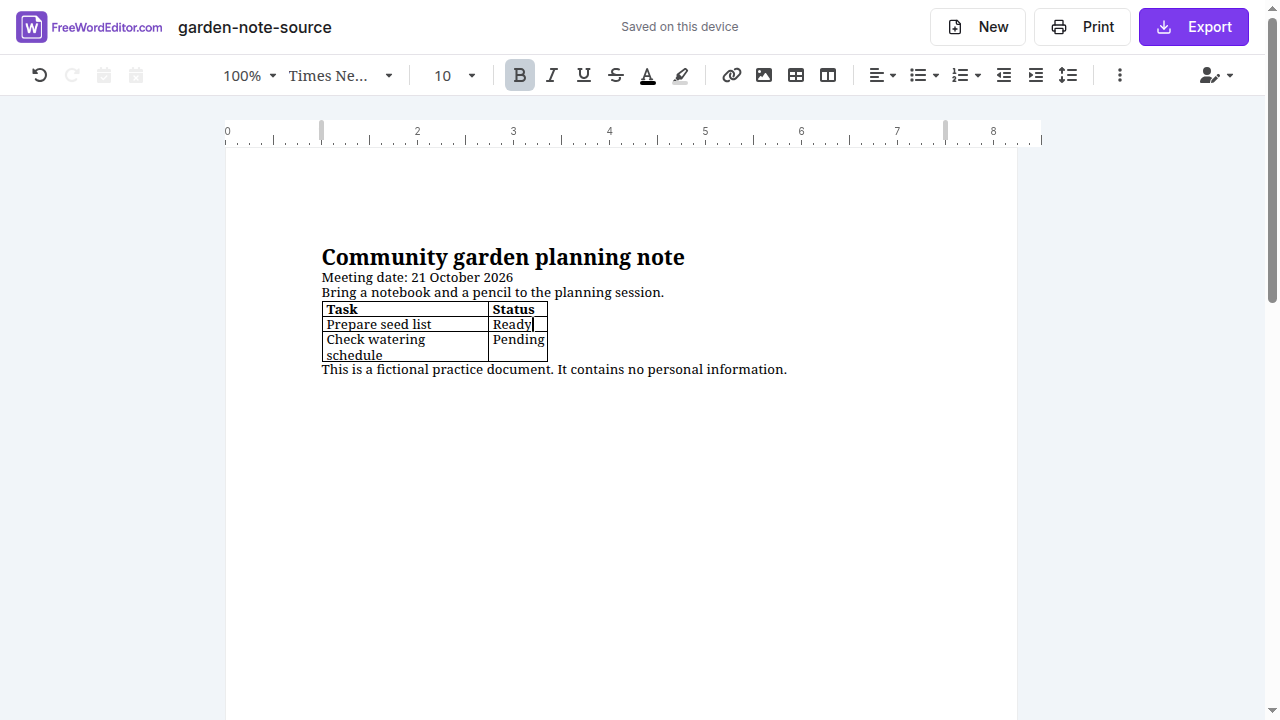
Download the source below, then open it with Choose DOCX File on the editing tool. Make the three replacements shown in the comparison. Click inside the document to select the date or sentence; click inside the Draft cell to change just that cell's text.
Wait for Saved on this device, then choose Export > Word Document (.docx). The edited sample and editor captures below are provided for comparison.
What we checked: we made these three changes in the browser editor, waited for Saved on this device, and downloaded the DOCX through Export. We checked the downloaded document's stored text: it contained the new date, the longer sentence and Ready in the table; the old date and Draft were absent. The screenshots show the actual editor before and after these changes. This small example is not a test of complex documents, Microsoft Word rendering or PDF export.
To follow along, open the DOCX editing tool.
| Location | Before | After |
|---|---|---|
| Meeting date | 14 October 2026 | 21 October 2026 |
| Body sentence | Bring a notebook to the planning session. | Bring a notebook and a pencil to the planning session. |
| Prepare seed list — Status cell | Draft | Ready |
- Check your own download, not just the screen: open the DOCX in a Word-compatible editor and look for the new date, the words “and a pencil” and the Ready table cell.
- The other task row should still say Check watering schedule — Pending. Review the table borders and spacing too; text verification alone does not establish layout fidelity.
What works in this editor — and what to check
The most reliable use case is updating ordinary text and its formatting in an existing DOCX. The toolbar is not a complete copy of Microsoft's ribbon; don't assume that a feature described in a Word tutorial is available here.
- Text — add, delete and rewrite anything in the document
- Formatting — fonts, sizes, bold, italics, underline, colors and highlights
- Paragraphs — alignment, line spacing, bullet points and numbered lists
- Existing tables — edit text within cells, then inspect the exported table for shifts
- Existing images and letterheads — check their position in the downloaded file, especially anchored objects
- Headers, footers, automatic page numbering and section features — review the output carefully; creating or changing these may require Microsoft Word or another full Word-compatible editor
- Page layout — inspect page breaks and margins after exporting, rather than assuming pixel-perfect fidelity
Why edit online instead of installing software?
If you cannot install desktop software, a browser editor can be convenient for quick changes on a Chromebook or shared computer. It doesn't replace every advanced feature of desktop Word, and Microsoft also offers a web version with its own feature set.
FreeWordEditor.com processes the document in your browser instead of uploading it to a document-processing service. The current document is kept in this browser's storage to support recovery; on a shared computer, use New to remove the local copy when finished.
You do not need an account. However, browser storage is not a backup and does not follow you to a different device. Download the DOCX before leaving if you need to keep an editable version.
Common editing tasks and how to do them
Here are the things people most often need to change in a Word document, and how to handle them in an online editor:
Ready to make these changes? Edit your DOCX online.
- Replacing a name or date: click to place your cursor, select the text and type the replacement — just like any word processor.
- Changing a font: select the text you want to change, then pick a new font from the toolbar dropdown.
- Updating a table: click inside a cell to change its text. If you need to restructure the table, check whether the available toolbar supports the operation and inspect the exported result.
- Adjusting spacing: select a paragraph, then use the line spacing control in the toolbar.
- Removing a section: select everything you want to delete and press Backspace or Delete.
- Adding a signature line: type a labelled line or start from a template; do not assume this editor can create a digital signature.
Saving and downloading your edited document
The status near the document title changes from "Unsaved changes" to "Saving…" to "Saved on this device" after a local save. If it says "Not saved — download a copy", do not rely on browser recovery: export a DOCX immediately.
Export > Word Document (.docx) downloads an editable file; Export > PDF Document (.pdf) downloads a PDF. Exporting does not clear your locally saved edits. If you need both formats, export each separately and check both downloads.
The editor stores your current document in this browser until you replace it, choose New, or remove it through the Privacy page. A downloaded file is a separate copy. New removes the browser's current-document copy, not files you downloaded.
A practical check before sending an important file
After editing a letter or form, reopen the downloaded DOCX in a Word-compatible app and make sure your new words are present. If you also need a PDF, open that download and look at every page, not just the editor preview.
Pay particular attention to names and dates inside tables, letterheads, page breaks, images and headers. DOCX rendering differs between applications. This check matters more than a successful-download message: a file can download successfully while its layout still needs adjustment.
Frequently asked questions
Is it really free?
Yes. Uploading, editing and downloading documents is free. There are no premium plans, trials or hidden charges. Advertising may help fund the service if it is enabled.
Will my formatting be preserved?
Common text and formatting are generally retained, but exact fidelity is not guaranteed. Check the downloaded DOCX or PDF, particularly for letterheads, images, tables and complex Word features.
Do I need to create an account?
No. There is no sign-up, no email required and no login. Open the site, drop in your file and start editing.
What file formats does it accept?
The editor works with .docx files, which is the standard format used by Microsoft Word since 2007. If you have an older .doc file, you'll need to resave it as .docx first — most applications that can open .doc files can do this.
Can I edit a document on my phone?
Yes, the editor works on mobile browsers. For comfortable editing, a tablet or desktop gives you more screen space, but phones work fine for quick fixes.
Is it safe to use for confidential documents?
Document processing happens in your browser without sending the file to our servers. The current document is stored locally in that browser until replaced or removed, so clear it when using a shared device and keep a separate downloaded copy.
Related guides
Make quick DOCX edits for free
Open a DOCX or start a basic document. Editing happens locally in your browser; check complex formatting in your downloaded copy.